Summary
Vero handles all incoming leads for Aimee and Gabe, and in this training she walked the team through her end-to-end process. Five things to take away before you read the full piece:
- Follow Up Boss is the source of truth. If a lead is not in FUB, it is not yours. Always check FUB before assuming a Real Geeks lead belongs to you.
- Personal contact beats automation, always. A personalized email plus a text on day one outperforms the drip every time. The drip is a backstop, not a strategy.
- Tag and stage every lead from the moment it comes in. Future you, with 4,000 contacts in the database, needs to be able to filter cleanly. Be consistent with tag names.
- Each platform has its own job. Real Geeks captures and auto-creates a generic portal that you must personalize. Flex builds the detailed, filtered portal you actually want clients to use. FUB is where you run the relationship from.
- Pause the drip the moment a lead replies. Nothing kills credibility faster than an automated “how are you doing” email landing the day after a real conversation.
The big picture: three platforms, three jobs
Boardwalk runs leads through three connected systems, and most confusion in the office comes from not knowing which one does what.
Follow Up Boss (FUB) is your database and command center. It is where you check whether a lead is yours, where you log calls and notes, where you set tags and stages, and where you trigger texts and emails. If a lead doesn’t appear here, it doesn’t belong to you, even if you’re seeing them in Real Geeks.
Real Geeks is one of the lead-capture portals. When someone registers on our public-facing site, they land here first and get an auto-generated search ($50,000 to $3,000,000 in Bucerías, no matter where they actually want to buy). They then flow into FUB through round-robin assignment. Real Geeks also keeps its own inbox, and some client messages stay there and never sync to FUB. Check it daily.
Flex is the MLS. It is where you build the real, personalized portal for a client once you know what they want. It is also where you filter by commission, build tour lists, and run a proper CMA. Flex is where the work gets serious.
A lead’s life looks like this: registers on a public site → lands in Real Geeks → routed to you in FUB → you personalize the Real Geeks search → after the third drip email, you graduate them to a properly filtered Flex portal.
When a lead first comes in
The drip system fires a welcome email automatically the moment a lead is created. Vero treats that as the floor, not the ceiling.
Her first move is to verify the lead’s data. Wrong addresses are common. Phone field empty or populated? That decides whether you can text.
Next, she checks Home Activity inside FUB to see what the lead has actually been looking at. Then she cross-references the original portal. If they came in through Real Geeks, she opens Real Geeks too, because the platforms sometimes show different activity.
Then she sends a personalized email matched to what they viewed. Not a template. A real note saying “I saw you were looking at X, here are a few similar options.” If there is a phone number, she also sends a text from the FUB platform.
Why text from FUB and not your phone? Two reasons. First, FUB gives you a US number that masks your real one, which the client sees. When they reply or call that US number, it routes to your real phone. Second, the system logs the conversation so the whole team can see it. To set this up, go to Settings in FUB, fill out your profile, and link your personal phone to the US number the platform assigned you. Note: FUB does not accept Mexican numbers for outbound calls to leads.
Vero’s rule of thumb on first contact: “The system works well, the portals work well, but there is nothing like person to person.”
Organizing leads inside Follow Up Boss
This is the part that pays off six months from now, not today. Future you will be sitting on thousands of leads and trying to filter for “two-bedroom condo, Romantic Zone, over a million dollars.” That filter only works if you tagged consistently from the start.
Tags. Use them for property type (condos, houses, land), bedrooms (2bed, 3bed), zones (Romantic Zone, Amapas, South Shore), and anything else you’ll want to filter on later. The hard part is consistency. If half your contacts say “condo” and half say “condos,” the filter breaks. Pick one and stick with it. Always lowercase, always plural, or whatever standard you choose, but pick a standard.
Stage. A fresh contact stays at “Lead.” The moment they reply or you have a real conversation, change it to “Active.” This is one of your most useful filters.
Notes. The Price field on a contact holds one number, so put the maximum budget there. Then in Notes, write the actual range (“250 to 400”), the area preferences, condo vs house, and anything else specific. Pin important notes by clicking the star so they appear at the top.
Do Not Contact. When a lead opts out, or when you discover the lead is actually someone else’s, tag them “do not contact” so they get excluded from batch emails and David’s company-wide newsletters.
The drip, and when to pause it
The drip is automated. After the welcome email, the next drip message goes out roughly three days later, then continues on a schedule.
Vero’s rule: if a lead responds before the next drip fires, pause the drip immediately. The drip lives in the contact panel on the right side. There is a pause toggle. Use it. Otherwise the client gets a “hey, how are you doing, you haven’t responded” email the morning after they spent an hour on the phone with you.
If a lead has not responded by the third drip email, Vero opens a Flex portal for them. By this point the automated nudges have not worked, and a personalized Flex portal is the next escalation.
Real Geeks vs Flex portals
When a Real Geeks lead lands in your queue, edit the auto-generated search before doing anything else. Open Real Geeks, find their search, and:
- Tighten the price range to what they actually viewed.
- Set the area to the zones they were looking in.
- Always remove pre-construction. This is a Boardwalk standing rule unless the project is DGroup. Pre-construction listings flood the portal with properties we don’t want to lead with.
- Save.
If you skip this, the client gets daily emails about properties that have nothing to do with what they want, and they unsubscribe.
For Flex portals, build them properly the first time. Important filter: under “Selling Office Compensation” or commission filter, set the minimum to 3 percent. Boardwalk does not show properties from agencies that pay 2 or 2.5 percent on the buy side. We can revisit on a case-by-case basis once a client is in front of us, but the portal stays at 3 percent and up.
Other Flex setup tips: name the portal something you can find later (Vero uses “BB Properties for [Name]”), set the frequency to ASAP (the search is filtered enough that this won’t spam the client), and edit the email template so the client’s name shows correctly. The Flex template does not auto-detect the name; you have to type it.
For listings from Boardwalk’s own office, filter the Flex search by “Selling Office” containing “Boardwalk” to surface our own inventory first.
Handling duplicates (leads that aren’t yours)
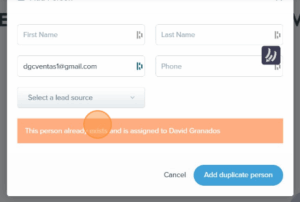
This comes up constantly. Real Geeks shows you a lead assigned to you, but FUB doesn’t have them. What happened?
The client probably registered originally on a different platform, was assigned to another agent, and then later registered again on Real Geeks under a different email. Boardwalk’s lead system follows the email, and once an email is in FUB under someone else’s name, that lead belongs to them, forever.
The check is simple: paste the email into the FUB search bar. If they come up under another agent, the lead is not yours. What to do:
- In Real Geeks, remove the workflow on that lead so they stop getting messages from you.
- Delete the portal you created (if you created one).
- Tag them “non-client” and “do not contact” in your own view.
- Email David and the rightful owner agent with the contact’s info, so the agent knows their client was active.
When in doubt, ask David. He can match contacts on phone, name, and other fingerprints to figure out who the lead actually belongs to.
The daily routine
Vero runs the same loop every morning and every evening:
- FUB bell icon. Shows every lead with activity today. Anyone marked “saved this property” gets a call or text the same day.
- Real Geeks inbox. Some client replies live only here and never reach FUB. Don’t miss them.
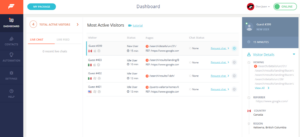
- Flex Contact Management. Shows the most active leads across your portals. The names that keep appearing here are the ones to call this week.
When she finishes her day’s tasks and has time, she pulls up the active leads list and starts calling. “If I have nothing pressing, I go to the bell, I see who is active, I look at the conversation history and the properties they’re viewing, and I call mentioning the property they just looked at.”
Randy’s old trick from the US side, which Vero endorses: if a lead doesn’t pick up, call twice. Many people screen the first ring, assume a robocall, and pick up on the second if it comes within a minute. Worth adding to your habits.
Call, text, or WhatsApp?
Text first, always. People answer texts. They don’t answer cold calls.
Call when you see the lead is genuinely active that day or the day before, and you have a real reason (“I saw you were looking at this property an hour ago, wanted to give you a bit more context”). If they don’t pick up, send a text immediately: “I just tried you from my number, didn’t want to bother you, let me know a good time.”
Move to WhatsApp once communication is established. Many clients prefer it, especially older ones who use WhatsApp Status. Vero has had clients re-engage with her months later because they saw a Boardwalk-related WhatsApp Status and remembered her.
Important: only add a lead to your personal phone after the first real conversation. Before that, keep everything inside the FUB system so the team can see it.
Other plays worth knowing
The accidental opt-out. Real Geeks sometimes triggers opt-outs by mistake, especially on mobile. When you get an opt-out notification, send a template: “I noticed you opted out, just wanted to make sure that was intentional.” A surprising number of people reply “no, I clicked by accident.” Some confirm the opt-out, which is also useful information because it stops you wasting time on a dead lead.
Leads with no activity. Some leads register and then vanish. No saved properties, no clicks, nothing. Vero’s move: send them the Boardwalk office listings as a starting menu. “Here’s what we have, anything catch your eye?” Office listings are a small enough list that it doesn’t feel like spam, and a no-activity client sometimes responds to the curation.
Adding family to a portal. When a client says “can you add my husband and kids so they all see properties,” use Add Relationships on the contact in Flex. This links the family members under one portal and prevents anyone from re-registering as a separate lead later. You can also merge an existing contact into the relationship if needed.
Tour listing collections. Before a tour, build a saved selection in Flex. Run a search (or paste in the MLS numbers separated by commas in Quick Search), check the listings going on the tour, then click Save Selected As and name it something like “Tour Client X, First Visit.” It lives under your Listing Collections and is reusable. Pin it as a favorite so it appears in the top bar.
Using AI without sounding like AI
Vero uses ChatGPT regularly, especially for English emails and CMA summaries. Two rules:
- Don’t trust it blind. Always review the output, fix what doesn’t sound like you, and make sure facts are correct. AI hallucinates property details and prices.
- Don’t overuse it. Clients can tell when an email was written entirely by AI. Use it to break through writer’s block or to translate a Spanish draft to English, then polish until it sounds like a real person wrote it.
For CMAs, Vero exports the comparable sales from Flex into an Excel file and feeds that to ChatGPT to summarize for the client. Full CMA reports can overwhelm a seller. A two-paragraph plain-English summary lands better. She still reviews everything and adjusts the recommended list price herself, because ChatGPT will sometimes suggest a number that ignores how long a comparable has been sitting on the market.
The bottom line
Most of what Vero teaches in this training is not glamorous. It is consistency. Tag the lead. Update the stage. Pause the drip. Check the bell. Personalize the portal. Call when there is activity. Text first. Move to WhatsApp when the relationship is real.
The agents who win in this market are not the ones with the cleverest system. They are the ones whose system is actually running on every lead, every day, without gaps.
If you take one thing from this session: the lead you forget about today is the closing someone else gets next quarter.