 Common Issue
“I see leads in Real Geeks that aren’t in my FUB dashboard.”
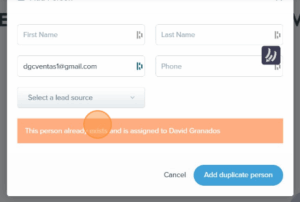
This happens because Real Geeks doesn’t verify whether the lead already exists. It simply pushes new registrations into FUB without checking for prior history or ownership.
 Step 1: Understand the Ecosystem
We receive leads from both digital and non-digital sources:
 Digital Sources (automatically synced to FUB)
- Boardwalk IDX (boardwalkrealtypv.com)
- Real Geeks – Condo Site (puertovallartacondosearch.com)
- Real Geeks – House Site (puertovallartahousesearch.com)
- Lofty – (buyinginpv.com)
 Non-Digital Sources (must be manually entered into FUB)
- Walk-ins
- Office calls
- Sign calls
- Print ads
 Any lead from a non-digital source must be manually entered in FUB — and may already exist under another agent.
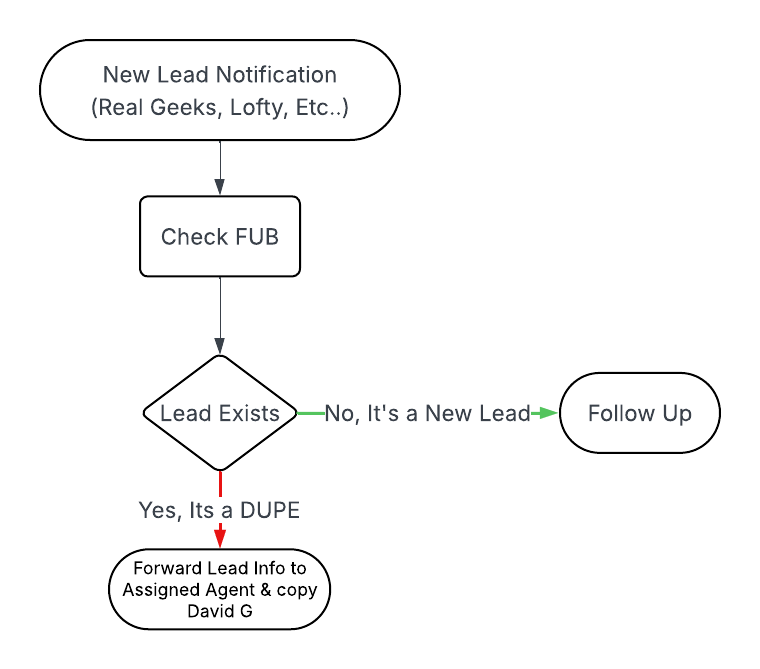
 Step 2: When You Receive a New Lead
- Open FUB
- Use the global search bar to look up the lead by name, phone number, or email
 If the lead is already assigned to another agent in FUB, do not contact the lead. Forward the lead’s information to the other agent.
 Step 3: If the Lead Already Exists in FUB…
 Do this:
 Search FUB to confirm the assignment
 Notify the assigned agent
 Forward relevant context (properties viewed, source, messages)
 CC David G if the lead came from Real Geeks
 Do NOT:
- Engage the lead if it’s not assigned to you
- Attempt to reassign the lead manually in Real Geeks
- Assume a lead is yours just because it’s in Real Geeks
Special Note on Real Geeks Assignments
- Each Real Geeks site has its own user list
- Some agents are only active on one site
- A lead may register on both sites, causing conflicting assignments
- FUB maintains true ownership regardless of Real Geeks
- Only David G can adjust RG assignments — and only between users on the same site
Example: Leads from RG Site 1 (Condos) cannot be reassigned to users on RG Site 2 (Houses), and vice versa.
 Real-World Example #1: A Lead Duplicated 4 Times
Meet: Patrick Smith
- May 1 – Registers on Boardwalk IDX. Assigned to Aimee Lezama.
- May 3 – Registers on puertovallartahousesearch.com. Assigned to Mike Green.
- May 5 – Registers on puertovallartacondosearch.com. Assigned to John Swanson.
- May 6 – Calls a property sign. Ever (floor time) checks FUB and sees it’s already assigned to Aimee.
What happens:
- FUB attaches all activity to Aimee’s profile
- Only Aimee should engage with Patrick
- Mike, John, and Ever forward all context and CC David G (especially if from RG)
- FUB keeps the lead history clean, even if RG assignments can’t be edited
Real-World Example #2: Duplicate via Both Real Geeks Sites
Meet: Samantha Davis
- July 1 – Registers on puertovallartacondosearch.com. Assigned to John Swanson.
- October 12 – Registers on puertovallartahousesearch.com. Assigned to Mike Green.
What happens:
- FUB recognizes her email and logs activity under John’s existing profile
- Mike receives a lead alert from Real Geeks but won’t see Samantha in FUB
- Mike should:
- Search for Samantha in FUB
- Confirm she’s assigned to John
- Forward all relevant info to John
- CC David G
Special Considerations
- Multiple emails = multiple leads: FUB may not detect duplicates across emails
- Family members or partners: Separate registrations may not be linked automatically
- Client requests to switch agents: If the client makes a request in writing, David G or Mike Green can reassign the lead in FUB
 Be flexible with fellow agents — remember: What Goes Around… Comes Around.
It’s often best practice to discuss a referral fee or a fair arrangement, but those are agent-to-agent matters and not part of this SOP.
Agent Checklist
- Search FUB (name, phone, or email)
 Use global search if needed
- If lead is already assigned:
- Don’t contact them
- Forward all context to the assigned agent
- CC David G (if from Real Geeks)
- Don’t try to reassign leads manually
- Don’t assume a Real Geeks lead is yours until you verify in FUB