How to Generate a Ranking Report in FlexMLS (Previosly Market Penetration Report)

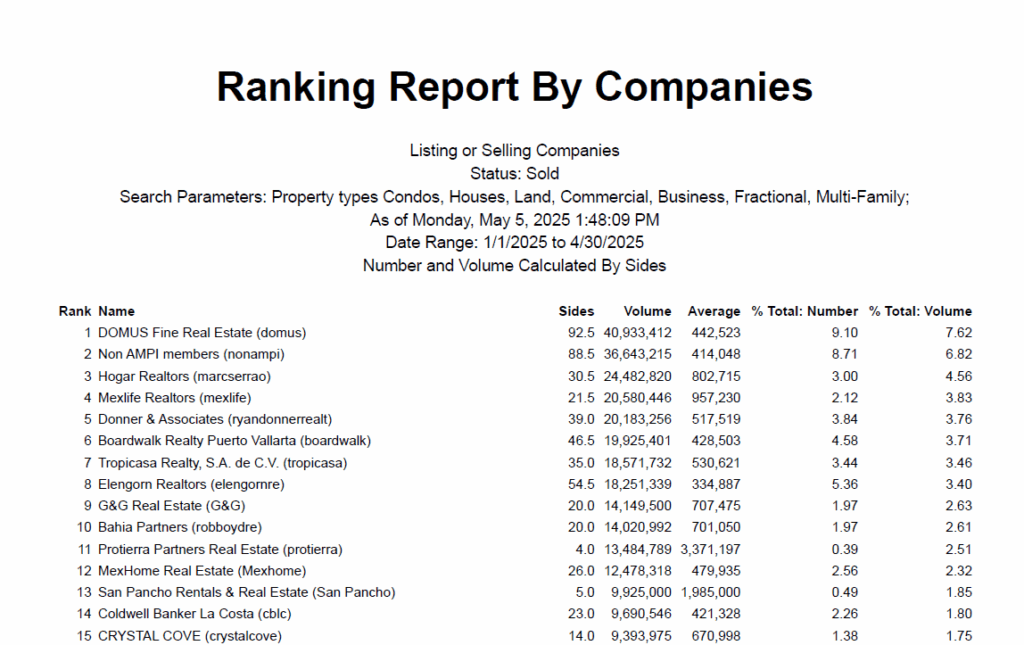
In this guide, I’ll show you how to generate a Ranking Report in FlexMLS (formerly known as the Market Penetration Report).
This report ranks real estate companies by sides and volume based on sold listings, giving you valuable insights into market share and performance across different agencies. You’ll learn how to filter by property types, date ranges, and other key parameters to get a detailed breakdown like the one shown below.

2. Click here.

3. Click "Inventory & Production"

4. Click "Ranking Report"

5. Click "Run Report"

6. Click "Closed"

7. Select the date range of this report

8. Click this button.

9. Click "Rank Companies"

10. Click this button field.

11. Click "Dollar Volume"

12. Click "Listing or Selling Companies"

13. Select the total number of members to be displayed

14. Click Next to run the report

Other Materials

2026 Recordings

Mastering Follow-Up

How Vero Aranda runs every lead through Follow Up Boss, Real Geeks, and Flex without losing any of them. A practical walkthrough of the daily system she uses for Aimee and Gabe’s pipeline, with the templates, tags, and shortcuts that keep the database clean.

Read More »
Quick Guides

BW Chat Guide (Formilla)

📘 BW Chat Guide (Formilla) Purpose This guide explains how to use Formilla Chat while on floor duty so we can respond to website visitors

Read More »
Quick Guides

Create a File Request Link

1. Navigate to https://cloudboardwalk.com/ and login 2. Use File Station 3. Click “Boardwalk Cloud” 4. Navigate to the listing / deal folder 5. Right click

Read More »
Quick Guides

FUB Dupe Check

Learn how to properly search for existing leads and avoid duplicate entries in the system. This guide walks you through checking by name or email, recognizing system warnings, and following the correct steps when adding a new contact

Read More »
Quick Guides

File Server 101

Learn how to access, share, and request files using our Synology-powered File Server. This step-by-step guide includes screenshots for logging in, sharing public links, requesting uploads from clients, and accessing files from your phone.

Read More »
SOPs

Lead Handling & Duplication Protocol

To ensure consistency, accountability, and clarity when handling duplicate leads (“dupes”) across all platforms, ensuring the original agent retains the lead and preventing duplicate outreach.

Read More »

This internal platform contains confidential and privileged information intended solely for authorized team members of Boardwalk Realty. The materials shared here, including training videos, documents, and internal processes, are for internal use only. Unauthorized access, distribution, copying, or disclosure of any content is strictly prohibited.